
Quick Summary
Removing unwanted characters, extra spaces, and unnecessary numbers from text improves readability, formatting, and overall content quality. Whether you’re editing AI-generated content, cleaning copied text from PDFs, or preparing documents for publication, online text editing tools make the process faster and more accurate. This guide explains the best methods to clean messy text while preserving important information.
Featured Snippet Answer
Removing unwanted characters, spaces, and numbers from text helps create cleaner, more professional content. Online text editing tools automatically remove unnecessary formatting, duplicate spaces, and unwanted symbols, making documents easier to read, edit, and publish without spending hours on manual cleanup.
How Messy Text Affects Your Content
Text formatting plays a major role in how readers interact with your content. Even well-written articles can look unprofessional when they contain unnecessary symbols, multiple spaces, random numbers, or inconsistent formatting.
Messy text often appears after copying content from PDFs, OCR software, AI writing tools, spreadsheets, websites, or email conversations. These formatting issues make articles difficult to read and increase the amount of time required for editing.
Instead of manually deleting every unwanted character, writers can use online text editing tools to clean text within seconds.
Whether you’re a blogger, student, marketer, developer, researcher, or business owner, keeping your text clean improves both readability and productivity.
Common Sources of Unwanted Characters
Many people assume formatting problems happen only when copying text from PDFs. In reality, unwanted characters can appear from several different sources.
AI-Generated Content
Artificial intelligence tools produce content quickly, but the formatting isn’t always ready for publishing. You may notice inconsistent spacing, repeated sentences, unnecessary blank lines, or unusual symbols that require editing before publication.
PDF Documents
Text copied from PDF files often contains broken sentences, random line breaks, strange symbols, and irregular spacing. These issues occur because PDF files store text differently from editable documents.
OCR Software
Optical Character Recognition (OCR) converts scanned documents into editable text. Although modern OCR software is accurate, it can still introduce incorrect characters, misplaced numbers, or unexpected punctuation marks.
Excel and CSV Files
Exporting data from spreadsheets frequently leaves extra tabs, commas, quotation marks, numbers, or special characters that are unnecessary when preparing readable content.
Websites
Copying text from web pages may also bring hidden HTML formatting, extra spaces, or unwanted characters that reduce the quality of your document.
Email Conversations
Email signatures, reply markers, timestamps, and copied formatting often leave documents cluttered with unnecessary information that should be removed before publishing.
Types of Unwanted Characters You May Need to Remove
Different projects require different levels of text cleaning. Sometimes you only need to remove extra spaces, while other situations require deleting numbers, punctuation, or special symbols.
Common unwanted characters include:
- @
- %
- &
- ^
- _
- |
- ~
- `
- <
- {
- }
- [
- ]
- (
- )
- /
- \
- “
These characters may be useful in programming or technical documents but are often unnecessary when preparing blog posts, reports, or marketing content.
Why Extra Spaces Reduce Readability
Extra spaces may seem harmless, but they can significantly reduce the overall appearance of your content.
Common spacing problems include:
- Multiple spaces between words
- Leading spaces at the beginning of lines
- Trailing spaces at the end of sentences
- Empty lines between paragraphs
- Mixed tabs and spaces
Although readers may not consciously notice every spacing error, these issues make documents appear less polished and harder to scan.
Cleaning unnecessary spaces creates a more consistent layout and improves the reading experience across desktop and mobile devices.
When Should You Remove Numbers from Text?
Numbers are useful in many situations, but there are times when removing them makes your content cleaner and easier to process.
Examples include:
- Cleaning customer names exported from databases
- Preparing keyword lists
- Removing product codes
- Editing copied reports
- Cleaning OCR-generated documents
- Formatting mailing lists
- Preparing AI training datasets
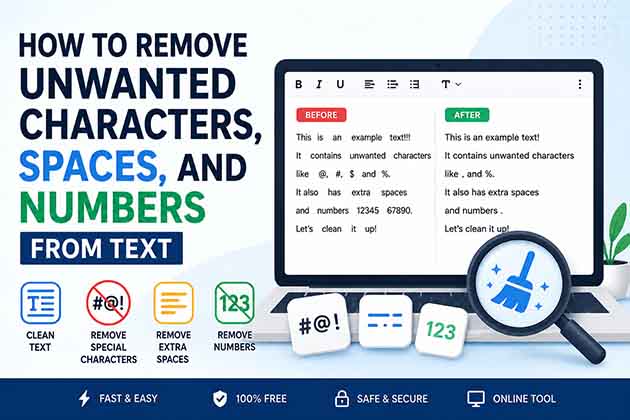
For example:
Before
John245 Smith887
Invoice 123456
Sample789 Text
After
John Smith
Invoice
Sample Text
Instead of editing every line manually, an online text cleaning tool can remove numbers automatically while keeping the remaining text intact.
How to Remove Special Characters Without Affecting Your Content
Removing special characters should always be done carefully. While some symbols are unnecessary, others may be essential to the meaning of your content.
For example, punctuation marks such as periods, commas, question marks, and apostrophes are necessary for readability. However, random symbols introduced during copying or exporting text may serve no purpose and can safely be removed.
Modern online text editing tools allow you to choose exactly which characters to remove, giving you greater control over the cleaning process.
The Benefits of Removing Extra Spaces
Extra spaces make text look inconsistent and difficult to read. They also create unnecessary formatting problems when publishing articles, reports, or documents.
Cleaning extra spaces provides several advantages:
- Improves readability
- Creates consistent formatting
- Makes documents look more professional
- Reduces editing time
- Simplifies copying content into WordPress or other editors
- Improves the appearance of tables and lists
A clean document is easier for both readers and editors to understand.
Best Online Methods for Cleaning Text
There are several ways to clean messy text, but browser-based online tools are among the fastest and most convenient options.
Use an Online Text Editor
An online text editor lets you paste content, make formatting changes, and prepare documents for publishing without installing additional software.
Many editors also include useful features such as:
- Word counting
- Character counting
- Text formatting
- Copy and paste support
- Undo and redo
- Auto-saving
- Export options
These features simplify the editing process while keeping everything in one place.
Remove Unwanted Spaces
Instead of manually pressing the Backspace key hundreds of times, use a dedicated text cleaning tool that removes duplicate spaces, leading spaces, and trailing spaces automatically.
Remove Unwanted Numbers
When working with exported datasets or OCR documents, removing numbers can make the text much easier to read. Browser-based tools complete this task instantly while preserving letters and punctuation.
Remove Duplicate Lines
Duplicate lines often appear when combining multiple files or copying AI-generated content. Removing repeated lines creates cleaner documents and reduces unnecessary repetition.
Remove Line Breaks
Copied PDF content frequently contains unwanted line breaks after every sentence. A line break removal tool restores proper paragraph formatting while preserving the overall structure of the document.
Step-by-Step Guide to Cleaning Text
Cleaning text does not require advanced technical skills. Most online tools complete the process in just a few simple steps.
Step 1: Paste Your Text
Copy the content from your document, PDF, spreadsheet, website, or AI writing assistant and paste it into the text editor.
Step 2: Choose What You Want to Remove
Select the cleaning options that match your needs.
Examples include:
- Remove special characters
- Remove numbers
- Remove extra spaces
- Remove duplicate lines
- Remove blank lines
Step 3: Preview the Results
Before copying the cleaned version, review the output to ensure that no important information has been removed.
Step 4: Copy the Clean Text
Once you’re satisfied with the results, copy the cleaned text and paste it into your document, CMS, or website.
Step 5: Perform a Final Review
Although automated tools save time, a final manual review helps catch formatting issues that may require additional adjustments.
Benefits of Using an Online Text Cleaning Tool
Using browser-based text cleaning tools offers several advantages over manual editing.
Saves Time
Tasks that normally take thirty minutes can often be completed in just a few seconds.
Improves Accuracy
Automated cleaning reduces the risk of missing hidden spaces, duplicate lines, or unwanted symbols.
Increases Productivity
Instead of spending time correcting formatting, writers can focus on creating better content.
Works Anywhere
Most online text editors work directly in your browser without requiring software installation.
Supports Multiple Content Types
Text cleaning tools are useful for:
- Blog posts
- Academic papers
- Marketing content
- AI-generated articles
- Reports
- Research documents
- Product descriptions
- Email drafts
Common Mistakes to Avoid
Cleaning text is straightforward, but several common mistakes can lead to unexpected results.
Avoid these practices:
- Removing punctuation that changes sentence meaning
- Deleting numbers that are important for dates or statistics
- Removing symbols from programming code
- Cleaning text without reviewing the output
- Publishing content immediately after automated editing
- Forgetting to preserve paragraph structure
A quick review after cleaning ensures that your document remains accurate and readable.
Best Practices for Cleaner Text
Following a few simple practices helps produce professional-looking documents every time.
- Keep a backup of the original text before making changes.
- Remove only the characters that are unnecessary.
- Review cleaned text before publishing.
- Preserve meaningful formatting whenever possible.
- Use browser-based tools for faster editing.
- Proofread the final document for grammar and readability.
- Follow Google’s helpful content guidelines when preparing articles for publication to ensure your content is useful, accurate, and reader-focused.
When You Should Not Remove Characters
Although removing unwanted characters is helpful, there are situations where deleting certain characters can change the meaning of your content or make it unusable.
For example, email addresses rely on special characters such as @ and . to remain valid. Removing these characters will break the address completely.
Similarly, URLs require slashes, colons, periods, and question marks to function correctly. Removing these symbols can make links unusable.
If you’re working with programming code, symbols such as braces, brackets, semicolons, quotation marks, and parentheses are essential. Deleting them may cause the code to stop working.
Mathematical formulas, scientific data, passwords, and configuration files also depend on specific characters. Before cleaning text, always consider whether the characters are meaningful or simply unwanted formatting.
A good text cleaning tool gives you control over what to remove, allowing you to preserve important content while eliminating unnecessary clutter.
Who Can Benefit from Text Cleaning Tools?
Online text cleaning tools are useful for a wide range of users across different industries.
Content Writers
Writers frequently copy information from research documents, AI writing tools, PDFs, or client files. Cleaning text before publishing helps produce more professional articles.
Bloggers
Bloggers often need to prepare articles for WordPress or other CMS platforms. Removing unwanted formatting ensures a consistent reading experience.
Students
Students can quickly clean notes copied from PDFs, scanned textbooks, or online resources before submitting assignments.
Digital Marketers
Marketing teams regularly work with spreadsheets, exported reports, email lists, and AI-generated content. Text cleaning tools help prepare documents faster.
SEO Professionals
SEO specialists often clean keyword lists, exported search data, and website content before analysis or publication.
Developers
Developers sometimes need to remove unwanted characters from datasets, log files, or imported text while preserving essential formatting.
Why Browser-Based Text Cleaning Tools Are Better
Browser-based tools have become increasingly popular because they eliminate the need to install software.
Some of the biggest advantages include:
- Accessible from any device
- No installation required
- Faster workflow
- Easy copy-and-paste editing
- Instant results
- Free to use in many cases
- Works across Windows, macOS, Linux, Android, and iOS
For everyday editing tasks, browser-based tools provide an efficient and convenient solution.
Improve Your Publishing Workflow
Cleaning text should be one of the final steps before publishing any document.
A simple workflow looks like this:
- Write or generate your content.
- Review the information for accuracy.
- Remove unwanted characters and formatting.
- Eliminate duplicate lines and extra spaces.
- Format headings and paragraphs.
- Proofread the final version.
- Publish with confidence.
Following this process helps reduce formatting errors while creating cleaner and more professional content.
Conclusion
Messy text can make even high-quality content appear unprofessional. Unwanted characters, extra spaces, duplicate lines, and unnecessary numbers reduce readability and increase editing time.
Fortunately, modern online text editing tools make cleaning text simple and efficient. Instead of manually correcting every formatting issue, you can remove unwanted elements within seconds while preserving the information that matters.
Whether you’re editing AI-generated content, preparing blog posts, cleaning exported data, or formatting research documents, using a reliable text cleaning tool helps improve productivity and produce better results.
Before publishing your next document, take a few moments to clean your text. A small amount of preparation can make a significant difference in readability, consistency, and overall presentation.
Frequently Asked Questions
How do I remove unwanted characters from text?
You can use an online text cleaning tool to automatically remove selected symbols, punctuation, or formatting while keeping the remaining content intact.
Can I remove numbers without deleting letters?
Yes. Many browser-based text cleaning tools allow you to remove numbers while preserving letters, punctuation, and paragraph formatting.
What’s the easiest way to remove extra spaces?
An online text editor or dedicated space remover can automatically eliminate leading, trailing, and duplicate spaces in seconds.
Will removing special characters damage my document?
Not if you choose the correct options. Always review the cleaned text to ensure important symbols, URLs, or email addresses remain unchanged.
Can I clean text copied from PDF files?
Yes. Online text cleaning tools are commonly used to remove unwanted line breaks, symbols, and formatting from copied PDF text.
Do these tools work with AI-generated content?
Absolutely. They are useful for cleaning formatting, duplicate lines, and spacing issues commonly found in AI-generated text.
Is it safe to clean text online?
Many browser-based tools process text locally within your browser. If you’re working with sensitive information, review the tool’s privacy policy before using it.
Are online text cleaning tools free?
Many online text editing and text cleaning tools are free to use and require no software installation or account registration.
External Resources
If you’d like to learn more about preparing clean, well-structured text for publishing, these trusted resources are worth exploring.
- Google’s helpful content guidelines – Learn how to create helpful, people-first content for the web.
- Microsoft Create – Writing Tips – Explore practical advice for improving writing and document quality.
- W3C Web Accessibility Initiative (WAI) – Understand accessibility best practices that improve readability for everyone.
These resources complement the tools available on Free Online Text Editor and can help you create cleaner, more readable, and professionally formatted content.